How to Become an AI Whisperer
Remember me asking "are voice notes are arrogant?" because they optimize YOUR time at the expense of the recipient's?

Here's the ai twist: when you're talking to your machine, especially AI, you should absolutely be using your voice. The calculation that made voice communication inefficient doesn't apply for AI and talking might be even better than typing in terms of context per minute.
TL;DR
You can speak at 110-150 words per minute but type at only 40-60 WPM. AI can now transcribe your rambling perfectly, entirely on your local device, keeping your voice private and text organized (but with a few extra —'s than you might use). Talking to your computer is fastest and best way to communicate with AI.
Why Local Transcription Matters
These tools run 100% on your local device. Unlike Siri, Alexa, Google Assistant, or cloud transcription services:
- Your voice never leaves your machine, so your audio files stay private
- Extremely fast (likely faster than remote) on modern hardware
- Really accurate
- Open source and free to use
Important: The transcription is private, but you still send the resulting TEXT (local LLM, Claude, ChatGPT, etc.), so be careful on the LLM's privacy policy. The privacy win is that your voice and audio stay on your device. No one is training speech models on your voice or storing your audio recordings.
Many of us are still typing Like It's 1999
 Pranay
According to one survey 84% of developers now use or plan to use AI tools. I suspect that number is not evenly distributed and your team could be much higher, that's a lot of prompt writing!
Every single one of those interactions starts with typing out a prompt. Prompts are different to code, they are more like a conversation or question. So speed of input is more of a factor. Most people type at around 40-60 WPM, but you could be speaking at 110-150 WPM. With such a frequent interaction, its worth investing time in optimizing how you prompt your AI (as I showed in my last post):
Stanford research shows speech is 3x faster than typing (161 WPM vs 53 WPM on average), so if talking can save you 1 minute per prompt, x5 (or more, per day) its worth to investing up to a day of effort to get that saving. And, that's for a 1 year payback, for a single dev, if you have a team, it could be worth investing a week or more.
We live in the future, so let's embrace it!
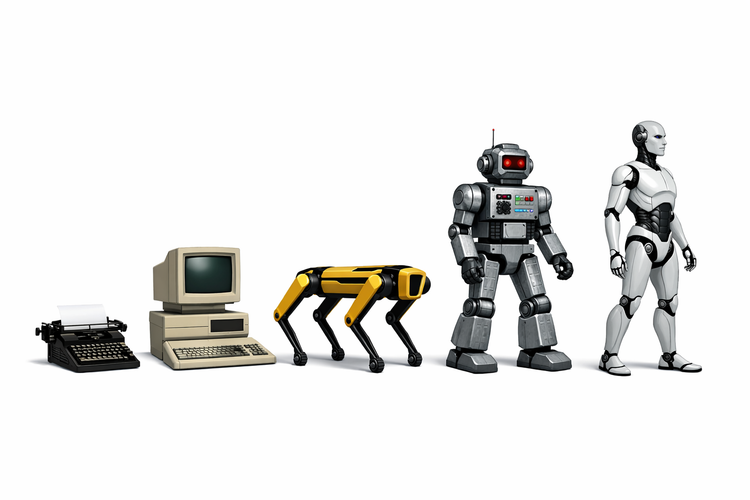
Then (2000s-2010s): The Dragon Era
Dragon Systems released NaturallySpeaking 1.0 in June 1997 as the first continuous dictation product. Before that, you had to pause. Between. Every. Single. Word.
The Dragon experience:
- Cost hundreds of dollars (professional versions still expensive today)
- Required 5-15 minutes of reading training text aloud
- Had to "train" wrong words by repeating them
- Privacy concern: Your voice data processed by corporate servers
- Microsoft acquired Nuance (Dragon's parent company) in March 2022 for $19.7 billion
It worked, but it was tedious. And you were always wondering: where is my voice data going? For most people, it was more hassle and cost than it was worth.
Now (2024-2025): The Whisper Revolution
OpenAI Whisper released in September 2022 changed everything:
- Open source under MIT license (free, auditable code)
- 100% local processing - your voice never leaves your device
- No training required - works immediately with your voice
- Handles rambling - designed for conversational speech (trained on podcasts/interviews)
- Cross-platform - Apple Silicon, Intel Mac, Windows, Linux
- Massive training - 680,000 hours of multilingual and multitask supervised data
The Privacy Game-Changer
Unlike Siri, Google Assistant, Alexa, or Dragon's cloud services, these tools transcribe everything on your device. Your voice audio never leaves your machine. So no worries about GDPR/CCPA/SOC or similar, as there is no external servers are processing your speech patterns, storing your audio, or training models on how you sound.
But remember, this is different from text privacy: You still need to be careful about what text you send to which LLM (just like you do when typing). But your voice, your audio files, your speech patterns? Those stay local.
Tools That Just Work
What I'm Using: Hex (Apple Silicon Mac)
Link: github.com/kitlangton/Hex
I'm using Hex because it's stupidly simple and works perfectly on Apple Silicon:
- Uses WhisperKit optimized for Apple Neural Engine
- 100% local processing - nothing leaves your Mac
- Two modes: press-and-hold hotkey or double-tap to lock recording
- First-time setup download your prefered model and off you go
- Pastes transcribed text directly into your active application
- Cost: Free, open source (MIT license)
Cross-Platform Alternative: Open-Whispr
Link: github.com/HeroTools/open-whispr
If you're on Windows, Linux, or Intel Mac:
- Works on Windows 10+, macOS 10.15+, Linux
- Privacy-first: Local Whisper models OR choose your API provider
- Global hotkey activation (default: backtick `)
- Multi-provider AI support: OpenAI, Claude, Gemini, or local models
- Cost: Free, open source
You can probably search the web for other options, but these are my two recommendations.
The Setup Pattern (Any Tool)
- Install the app (5 minutes)
- First run downloads Whisper model (one-time, automatic, 5-10 min)
- Set hotkey preference
- Grant microphone permission
- Start talking
- Be amazed at how easy it is, and how much it gets right
- Have to keep reminding yourself to use it (while you get used to it)
It actually helps the AI too
The counterintuitive part: Yes, voice creates more tokens. Yes, your transcription might include "um" and "you know." But here's what I've found actually happens:
Scenario A (Typing)
- You craft a careful, concise prompt (5 minutes, 100 words)
- AI responds based on limited context
- You realize you needed to explain more
- Back and forth 3-4 times
- Total time: 20+ minutes
Scenario B (Voice to Text)
- You ramble for 2 minutes, giving full context (300 words transcribed)
- AI has a more complete context in ONE shot
- Gets it right the first time (or perhaps 2)
- Total time: 3+ minutes
OK, OK, a bit of a straw man / best case, but the point is more context, faster. You could also spend an extra 1-2 mins editing and refining the text before sending it, if you like, but I rarely bother.
The Math
- 2.5x more input speed (speaking vs typing: 110-150 WPM vs 40-60 WPM)
- More context naturally, for the same time invested
- Result: AI gets it right in round 1 or 2 instead of 3-4
- Net savings: 85% less time, better results
An example 30 second prompt, typed:
"Make me a python function to transform Salesforce API data to Postgres schema, handle missing fields, log validation errors to Datadog"The same prompt, spoken in 30 seconds:
"Okay so I need a Python function that takes in user data
from our Salesforce API, you know, the JSON structure where
we have that nested contact_details object that sometimes
has the legacy_id field and sometimes doesn't because of
the 2019 migration we did, and I want it to format that
into the Postgres schema we're using in the new microservice,
making sure to handle cases where fields might be missing
or null because we still have those old records from before
we enforced validation, and also it should probably log any
validation errors to our internal Datadog instance without
throwing exceptions because we want the batch process to
continue even if one record fails, and we need to track
the failure rate for the SLA dashboard"Result: Same time investment, but AI gets 10x more context - the nested structure issue, the migration history, why fields might be missing, the error handling strategy. Gets it right first time instead of needing 3 follow-up clarifications.
More Context, Less Confusion?
When you type, you self-edit. You leave out details, because it would take too long to include them. You assume (or hope) the AI knows what you mean. You craft minimal, precise prompts.
When you speak, you naturally include more. The "obvious" stuff. Examples. You say "wait, let me rephrase that" and both versions get transcribed. You explain the actual constraints without overthinking word choice. You explain more of your chain of thought.
But, be careful, verbosity might not be a catch all solution:
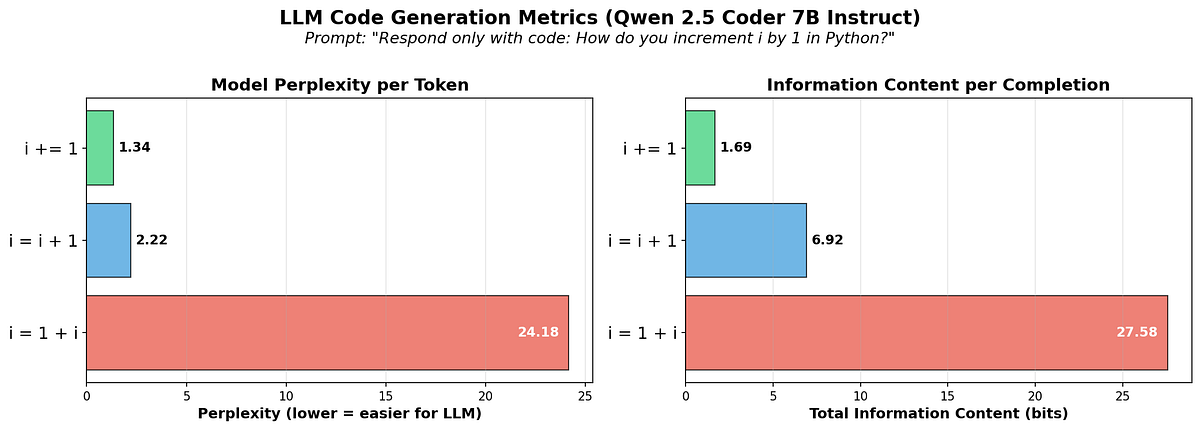
the terse version (i += 1) has lower perplexity than the verbose version.
....
Average surprisal-per-token, when exponentiated (a monotonic transform), is also known as perplexity, a common metric used for LLMs and their inputs and outputs.
So, what feels like inefficient rambling to you could be high-quality context for the AI. The false starts, the corrections, the "what I actually mean is..." might actually be gold for understanding your true intent. Or it might muddy the water, you will need to test and see what works best for you.
But, personally, I've had instances where I've gone from frustrating 10-interaction debugging sessions to few-shot solutions just by speaking the full context instead of typing minimal prompts.
It also makes you feel like you are living the the future... which we are.
Why Not Try This Today?
The 5-Minute Experiment
Pick your tool:
- Mac (Apple Silicon): Hex
- Any platform: Open-Whispr or WhisperWriter
- Privacy-focused: GoWhisper
Install (5 minutes, let model download)
Next time you're about to ask your AI assistant something:
- Hit your hotkey
- Explain the problem like you're talking to a colleague, naturally, without overthinking word choice
- Review the transcription (edit if needed, especially for sensitive data)
- Paste into your LLM and watch what happens
If you are worried about context poisoning, you could always use one agent to clean up your rambling then pass to another (copy paste or mcp/multi-agent) for the tighter execution.
As Bob said, its good to talk!
(only UK people of a certain age will get this reference).